AI and search
MCP for SEO: how I connected ConfiGrowth to ChatGPT and Claude

By Raúl Solana, founder of ConfiGrowth
Published 9 min read
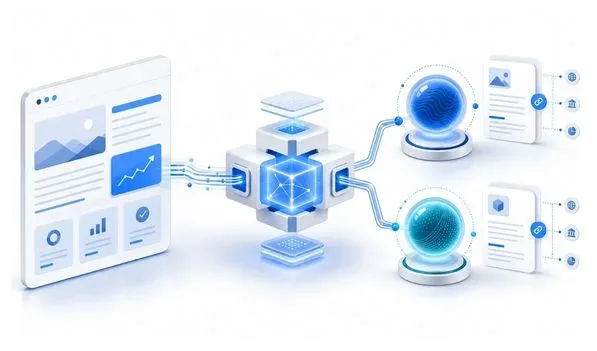
An MCP for SEO connects an AI assistant to specific sources and tools so it can query them during a conversation. I built one so that Claude and ChatGPT can search ConfiGrowth’s public information, retrieve the original content and link to the page that backs each answer.
It doesn’t replace Google, doesn’t train the model and doesn’t earn automatic mentions. It opens a direct channel between a company and the agents its users choose to connect.
In this article I cover:
- what information ConfiGrowth’s MCP offers;
- how the search-and-retrieve sequence works;
- how to install it in Claude and ChatGPT;
- what role these protocols can play in SEO and GEO.
I wanted to test it on a project of my own first. Before proposing MCPs to my SEO clients, I needed to see what the process demanded, where the problems showed up and whether the result was useful outside a technical demo.
What I built: an MCP for SEO connected to ConfiGrowth
ConfiGrowth’s MCP is a remote, public, read-only server. Its current endpoint is:
https://configrowth-mcp.raul-solana.workers.dev/mcp
A user can connect that address to a compatible client and ask from there about ConfiGrowth’s services, methodology, team or published case studies.
The server offers six tools:
| Tool | What it’s used for |
|---|---|
search |
Searches documents published by ConfiGrowth |
fetch |
Retrieves the full content of a result |
get_site_facts |
Returns verified company information |
get_service |
Looks up a specific service |
find_case_study |
Finds case studies by industry or need |
get_methodology |
Explains the phases, deliverables and measurement of the work |
Every result includes a canonical configrowth.com URL. The assistant can use it to check the source or include it in its answer.
The scope is intentionally limited. The MCP doesn’t browse arbitrary domains, doesn’t take actions on the website and doesn’t return prices or results that haven’t been published.
Searching the web and querying an MCP are not the same thing
The Model Context Protocol is an open standard for connecting AI applications to external data sources and tools. The practical difference is in how the assistant gets to the information.
| Web search | Connected MCP |
|---|---|
| The assistant searches across multiple domains | It queries the sources the server defines |
| Depends on the search engine’s crawling, index and ranking | It accesses tools and data during the conversation |
| It can mix first-party and third-party information | It can be restricted to official information |
| Content may be outdated or fragmented | The server controls its own update process |
| Available with no extra installation | The user has to connect the MCP |
This doesn’t make the MCP a ranking factor. If nobody installs it, its effect on conversations will be practically zero. Nor does it make ChatGPT or Claude permanently learn the company’s content.
Its value shows up inside the experiences where it’s connected. In that context, the agent has a clear path to consult the original source, retrieve a full document and attribute the information.
SEO is still necessary for a website to be crawlable, relevant and visible in search engines. AI SEO work adds another layer: making the brand and its content understandable, verifiable and citable in generative environments. An MCP can complement that work, but not replace it.
How ConfiGrowth’s MCP works under the hood
The flow can be summed up like this:
Public content from configrowth.com
            ↓
Extraction and normalization
            ↓
Document index
            ↓
search and fetch tools
            ↓
Claude, ChatGPT or another MCP client
When a user asks a question, the assistant can call search first. The tool returns results with a stable identifier, title, snippet, content type, update date and URL.
If it needs more information, it calls fetch with the document identifier. It then receives the full text, its provenance and the canonical URL.
For example, a search for “SEO consulting and AI visibility” currently returns SEO services pages, the AI SEO service and related content. The agent can then retrieve the chosen page without accepting an arbitrary URL sent from outside.
I built the system with the help of an AI agent specialized in building MCPs, combined with documentation and my own trial and error. Coding was only part of the work. What took the most time was interacting with the agent, reviewing decisions, understanding the protocol and documenting each behavior so that a demo that looked correct wouldn’t hide errors.
That experience was one of the project’s goals. I wanted to know the whole process before turning it into a service and applying it to client websites.
What you can ask it once it’s installed
The MCP is designed for questions about ConfiGrowth and its work. Here are some queries you can copy:
What services does ConfiGrowth offer to improve visibility in search engines and AI assistants?Explain ConfiGrowth's working methodology and what happens during the first 90 days.Find ConfiGrowth case studies related to hospitality.Which ConfiGrowth service fits an ecommerce store that needs to grow its organic traffic?Who makes up the ConfiGrowth team, and what is its official contact channel?Find official information about GEO and return the pages used as sources.
You can also describe a need without naming a specific tool. The MCP’s tool descriptions help the model decide whether to search, retrieve a document, look up a service or review a case.
I’ve tested it myself with Claude and it has worked well. The next step is to watch what questions the first users ask, which tools the model selects and where it needs better descriptions or clearer content.
How to install ConfiGrowth’s MCP for SEO
Installation is manual because the connector isn’t yet published in the official directories. You don’t need an API key or a ConfiGrowth account.
Installing it in Claude
Claude lets you add remote MCP connectors from its settings. Availability and admin controls vary by plan. Users in Team or Enterprise organizations may need an owner to add the connector first.
- Open Customize > Connectors.
- Click
+and select Add custom connector. - Enter
ConfiGrowth SEO & GEOas the name. - Paste this address:
https://configrowth-mcp .raul-solana .workers .dev /mcp - Finish the setup and enable the connector in the conversation where you want to use it.
Anthropic maintains instructions for custom connectors with the current steps and requirements.
Installing it in ChatGPT
In ChatGPT, connecting custom MCP apps depends on your plan and your workspace settings. Full compatibility is currently offered in beta for Business, Enterprise and Edu.
- Open Settings > Apps > Advanced settings.
- Turn on Developer mode if your account or admin allows it.
- Under Apps, choose the option to create an app.
- Enter the name
ConfiGrowth SEO & GEO. - Add the endpoint:
https://configrowth-mcp .raul-solana .workers .dev /mcp - Select the option with no authentication.
- Click Scan tools.
- Check that all six tools appear and create the connection.
OpenAI explains the current conditions in its documentation on developer mode and MCP apps.
The names and location of some options may change. If custom app creation doesn’t appear, check your plan, your workspace permissions and the linked documentation.
Check that the connection works
Start with a simple query:
Use ConfiGrowth SEO & GEO to list the published services.
Then try the full sequence:
Search ConfiGrowth information about AI SEO and retrieve the most relevant source.
The answer should include information coming from the server and a public configrowth.com URL. If the assistant answers without using the connector, enable it explicitly in the conversation or mention it by name.
Privacy and security: what the MCP can look at
The server provides ConfiGrowth’s public information and works in read-only mode. It can’t publish content, modify WordPress, submit forms or make payments.
The assistant sends the MCP the arguments needed to run the selected tool, for example a search query or a document identifier. By default, the server doesn’t need to receive the whole conversation history.
Corporate responses deliberately leave out data such as the tax ID number, the postal address or the personal phone number. The available data is limited to published professional information: team, services, general location, methodology and official channels.
I’ve also restricted the sources that can appear in results. search returns allowed ConfiGrowth URLs and fetch works with known identifiers instead of accepting any internet address.
You can read the privacy policy and disconnect the MCP at any time from your assistant’s settings.
What an MCP can bring to SEO and GEO
My motivation starts from a simple thesis: a growing share of search and online browsing will move to queries made through agents. If that shift continues, companies will need to offer information in formats those agents can query accurately.
I’m not claiming every website will necessarily need an MCP, or that installing one guarantees visibility. I do think it’s worth experimenting now, understanding its limits and preparing a methodology before clients start asking for it.
For a lead-generation business, an MCP could help a connected agent find services, locations, requirements, experts or relevant case studies. In an ecommerce store, it could expose product pages, features, availability or purchase policies through controlled tools. Each project would need to define its own sources, permissions and update processes.
Content quality is still the foundation. A server doesn’t fix a confusing value proposition, incomplete pages or unsupported claims. SEO and external authority still influence how a company gets discovered outside connected conversations.
Building this first MCP wasn’t an especially quick process. The interaction, documentation and testing take more work than a demo suggests. Even so, I think it’s important for lead generation and ecommerce businesses to explore this route to help their users find information from their own agents.
The immediate goal is to experiment with ConfiGrowth. After that, I’ll use what I’ve learned to assess building secure, citable MCPs for SEO and GEO clients.
Frequently asked questions about MCP for SEO
What is an MCP for ChatGPT or Claude?
MCP stands for Model Context Protocol. It’s an open standard that lets you connect an AI application to external tools and sources. A server can offer search functions, data lookup or action execution, depending on its design and permissions.
Does having an MCP for SEO automatically improve visibility?
No. The MCP only has an effect in experiences where it’s connected and the model decides to use its tools. It doesn’t improve Google rankings on its own, doesn’t train the model and doesn’t guarantee mentions in ChatGPT, Claude or AI Overviews.
Is installing the ConfiGrowth MCP free?
ConfiGrowth’s MCP is free and requires no authentication. The user does need access to a compatible client. Some custom connector features depend on the ChatGPT or Claude plan you’re on.
Can the MCP modify my website or my data?
No. The six current tools are read-only. They query ConfiGrowth’s public information and include no actions to create, edit, delete or send data.
Can the server read my entire conversation?
The client sends the data needed for the selected call, such as the text of a search. The MCP doesn’t automatically get unlimited access to the history, although the specific content it receives will depend on how the client builds each call.
Can I remove the connection?
Yes. You can disable or remove the connector from your assistant’s Apps or Connectors settings. Once you do, the model no longer has ConfiGrowth’s tools available.
You can try the MCP by copying this endpoint:
https://configrowth-mcp.raul-solana.workers.dev/mcp
If you want to assess what information an MCP should offer for your company, you can talk to me. First we’ll check whether there’s a real use case. Then we’ll define sources, tools, security and measurement.